Skip to content
Stay Organized, Save Valuable Content, and Boost Your Productivity
Social media has become an essential part of our everyday lives. Whether you’re chatting with friends, running a business, studying online, or creating content for your audience, chances are you use WhatsApp Status to share and discover photos, videos, announcements, quotes, and important updates.
Every day, millions of people open WhatsApp to view Status updates from family members, colleagues, businesses, influencers, and communities. These updates often contain useful information, memorable moments, creative ideas, promotional offers, educational resources, and inspiring messages. The challenge is that every WhatsApp Status automatically disappears after just 24 hours.
How many times have you thought:
- “I’ll save this later.”
- “I need this photo for inspiration.”
- “I want to remember this business offer.”
- “That quote was perfect—I wish I had saved it.”
By the time you remember, the Status has already disappeared.
This is why more Android users around the world are choosing to use a Status Saver App. It provides a simple way to manage content that matters, helping you keep important photos, videos, and ideas organized instead of losing them forever.
But a modern Status Saver should do more than simply save media. Today’s users expect tools that help them create content, stay productive, and organize their digital lives. That’s exactly where StatusCraft stands out.
In this guide, you’ll discover why a Status Saver app has become an essential tool for daily life, the common problems people face without one, and how an all-in-one solution like StatusCraft helps simplify content management for students, professionals, creators, entrepreneurs, and everyday WhatsApp users worldwide.
Table of Contents
What Is a Status Saver App?
A Status Saver App is an Android application that helps users manage and organize WhatsApp Status content they have already viewed. Instead of relying on screenshots or searching through hidden folders, a Status Saver provides a more convenient way to keep valuable content accessible.
While traditional apps focus only on saving photos and videos, modern solutions offer much more.
Today’s users expect features that help them:
- Organize saved Status photos
- Manage Status videos
- Create social media stories
- Design promotional posts
- Make inspirational quote graphics
- Save useful links
- Bookmark important resources
- Keep everything organized in one place
This evolution reflects a growing need for productivity apps that simplify everyday tasks rather than adding more complexity.
StatusCraft is designed around this idea, combining multiple creative and organizational tools into one lightweight Android application.
Why More People Need a Status Saver App Today
Digital content is growing at an incredible pace.
Every day, people share:
- Family memories
- Business promotions
- Product launches
- Event invitations
- Educational tips
- Recipes
- Travel ideas
- Motivational quotes
- Fitness advice
- Career guidance
Much of this valuable information is shared through WhatsApp Status.
The problem isn’t finding useful content anymore.
The real challenge is keeping it organized before it disappears.
People no longer want to lose important information simply because it expires after one day.
Instead, they want smarter ways to manage digital content.
A Status Saver app solves this problem by helping users build a personal collection of information they can revisit whenever they need it.
Whether you’re collecting inspiration for your next project, saving learning resources, or keeping memorable moments from friends and family, having an organized system makes everyday life easier.
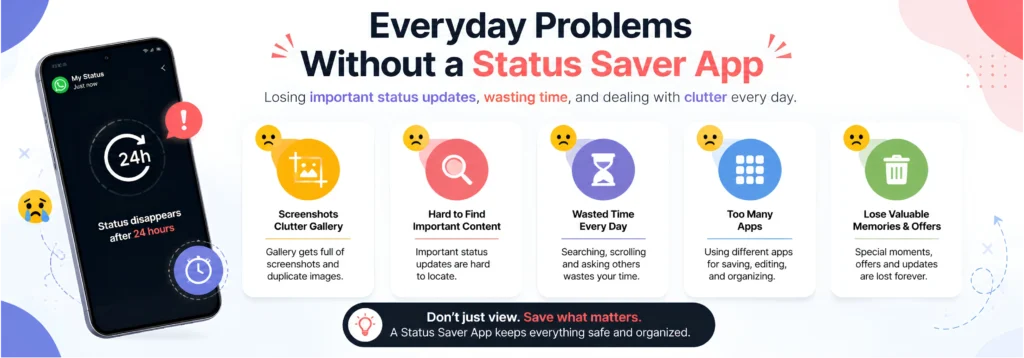
Everyday Problems Without a Status Saver App
Many people don’t realize how much time they waste because they don’t have an effective way to manage the content they discover online.
Here are some of the most common challenges users face every day.
1. Losing Valuable Content After 24 Hours
WhatsApp Status updates are temporary by design.
One day they’re available.
The next day they’re gone.
This often leads to frustration when users try to find a photo, announcement, or quote they forgot to save.
Whether it’s a business discount, an important reminder, or a memorable picture, once the Status expires, it’s usually no longer accessible.
2. Gallery Filled with Screenshots
Without a Status Saver app, many people resort to taking screenshots.
Although this works for occasional use, it creates several problems over time.
Your gallery quickly becomes cluttered with:
- Cropped images
- Duplicate screenshots
- Notification bars
- Battery icons
- Low-quality captures
Finding the one screenshot you actually need can become surprisingly difficult.
3. Wasting Time Searching for Information
Think about how often you revisit content you’ve already seen.
You may want to find:
- A restaurant recommendation
- A business contact
- A motivational quote
- A product you planned to buy
- A travel destination
- A recipe
- A useful website
Without an organized system, you’ll spend far more time searching than necessary.
4. Managing Too Many Apps
Today’s smartphone users often install different apps for different tasks.
For example:
- One app for saving Status updates
- Another for editing photos
- Another for creating stories
- Another for designing quotes
- Another for bookmarking links
Constantly switching between apps slows down your workflow and consumes valuable storage space.
An all-in-one solution simplifies everything.
5. Missing Creative Opportunities
Every Status you view could become inspiration for something new.
- A quote could inspire your next social media post.
- A product promotion could spark your next marketing campaign.
- A travel photo could inspire your next adventure.
Without a proper way to save and organize content, these creative opportunities are often lost forever.
Why Screenshots Are No Longer Enough
For years, screenshots were the default way to keep important WhatsApp Status updates.
While convenient, they no longer meet the needs of modern users.
Screenshots have several limitations:
- Reduced image quality
- Unwanted interface elements
- Poor organization
- Difficult searchability
- Increased gallery clutter
- No content categorization
- Limited productivity
As people rely more heavily on smartphones for work, learning, and creativity, they need smarter tools that help them organize digital content efficiently.
This is why dedicated Status Saver apps have become increasingly popular around the world.
Instead of creating a chaotic gallery filled with random screenshots, users can build a well-organized content library that supports both personal and professional needs.
StatusCraft takes this concept even further by combining content management with powerful creative tools like Story Maker, Post Maker, Quote Maker, Link Organizer, and Bookmark Manager, making it much more than a traditional Status Saver.
The Growing Shift Toward All-in-One Productivity Apps
Android users are changing the way they use mobile apps.
Instead of downloading a separate app for every task, people increasingly prefer platforms that combine multiple tools into one seamless experience.
This approach saves:
- Time
- Device storage
- Battery life
- Effort
- Screen space
More importantly, it creates a smoother workflow.
Rather than switching between five different apps to save content, create graphics, organize links, and bookmark ideas, users can manage everything in one place.
This shift is one of the biggest trends in mobile productivity, and it’s exactly the philosophy behind StatusCraft.
Top Benefits of Using a Status Saver App in Daily Life
A Status Saver app is no longer just another Android utility. For many people, it has become an essential productivity tool that helps them manage digital content more efficiently.
Whether you’re saving an inspirational quote, a business promotion, a recipe, a travel idea, or an important announcement, having a dedicated place to organize that content makes everyday life much easier.
Let’s explore the biggest benefits of using a Status Saver app and why millions of Android users now consider it a must-have application.
1. Never Lose Important WhatsApp Status Updates
One of the biggest frustrations with WhatsApp Status is that it disappears after just 24 hours.
People often save information like:
- Motivational quotes
- Business offers
- Product launches
- Event invitations
- Study notes
- Travel recommendations
- Family memories
- Restaurant suggestions
- Job opportunities
- Useful contacts
Without a Status Saver app, that information can be lost permanently.
A dedicated Status Saver ensures you always have access to the content that matters most.
2. Save Time Every Day
Think about how often you search for something you’ve already seen.
You might spend several minutes trying to remember:
- Which friend shared that quote?
- Where was that travel destination?
- Who posted the business discount?
- Which Status had the recipe?
Instead of searching through dozens of chats or hoping someone reposts the content, a Status Saver keeps everything organized and easy to access.
Saving just a few minutes every day adds up over time, making your digital life more efficient.
3. Keep Your Gallery Clean and Organized
Many users rely on screenshots to save WhatsApp Status updates.
Although screenshots are convenient, they quickly clutter your phone with:
- Duplicate images
- Notification bars
- Battery icons
- Cropped photos
- Random screenshots
Over time, finding one specific image becomes frustrating.
StatusCraft helps eliminate this problem by providing a dedicated space for managing your saved content instead of filling your gallery with unnecessary screenshots.
4. Build Your Own Content Library
Every day, you come across valuable content online.
Instead of letting it disappear, imagine building your own digital library filled with:
- Inspirational quotes
- Marketing ideas
- Design inspiration
- Business promotions
- Educational resources
- Travel destinations
- Healthy recipes
- Fitness tips
- Career advice
- Personal memories
With StatusCraft, your favorite content stays organized and available whenever you need inspiration.
5. Increase Your Productivity
Modern smartphone users don’t just consume content—they create it too.
Students, professionals, entrepreneurs, marketers, and creators all need tools that simplify their workflow.
Instead of switching between multiple apps, StatusCraft combines everything into one streamlined experience.
You can:
- Save inspiration
- Organize ideas
- Create stories
- Design social posts
- Make quote graphics
- Store useful links
This saves time and helps you stay focused on creating instead of searching.
6. Turn Inspiration into Original Content
One of the biggest advantages of using StatusCraft is that it doesn’t stop at saving content.
Imagine seeing an inspiring quote in a WhatsApp Status.
Instead of simply saving it, you can use it as inspiration to create your own:
- Story
- Social media post
- Quote graphic
- Promotional design
StatusCraft includes built-in creative tools that allow users to transform ideas into original content without needing additional design apps.
7. Manage Everything in One Place
Most Android users install separate apps for different tasks.
For example:
- Status Saver
- Story Editor
- Quote Maker
- Photo Editor
- Bookmark App
- Notes App
Managing multiple applications takes more time and consumes more storage.
StatusCraft simplifies this by combining multiple features into one lightweight Android app.
Everything stays in one place, making your workflow faster and more organized.
How StatusCraft Solves Everyday Problems
Many Status Saver apps focus on only one feature saving WhatsApp Status photos and videos.
StatusCraft goes much further.
It was designed to solve real problems faced by modern Android users who consume and create digital content every day.
Let’s explore how each feature adds value to your daily routine.

WhatsApp Status Saver
At its core, StatusCraft provides a reliable way to manage your favorite WhatsApp Status content.
Instead of relying on screenshots or complicated workarounds, you can keep important Status updates organized in one convenient location.
Whether it’s:
- Personal memories
- Inspirational quotes
- Business announcements
- Educational graphics
- Event information
StatusCraft helps ensure valuable content doesn’t disappear from your digital life.
Story Maker
Creating engaging stories no longer requires professional design skills.
StatusCraft’s Story Maker allows users to design attractive stories using customizable text, layouts, and colors.
Perfect for:
- Instagram Stories
- Facebook Stories
- WhatsApp Stories
- Personal updates
- Business promotions
Whether you’re sharing a memory or marketing a product, Story Maker helps your content stand out.
Post Maker
Businesses and creators constantly need fresh social media content.
Instead of opening complicated design software, StatusCraft makes it easy to create:
- Promotional graphics
- Product showcases
- Event announcements
- Business updates
- Social media posts
This feature is especially useful for entrepreneurs and small business owners who want professional-looking content without spending hours designing.
Quote Maker
Motivational and inspirational content continues to perform well across social media platforms.
StatusCraft’s Quote Maker helps users create visually appealing quote graphics using customizable fonts, colors, and layouts.
Perfect for:
- Coaches
- Students
- Influencers
- Educators
- Business owners
- Daily motivation pages
Sharing meaningful content becomes quick and effortless.
Link Organizer
Have you ever found a useful website but forgotten where you saved it?
StatusCraft includes a Link Organizer that allows you to keep valuable online resources in one organized location.
Save links to:
- Articles
- YouTube videos
- Business websites
- Learning platforms
- Product pages
- Online tools
Instead of searching through browser history or chat messages, everything stays organized and easy to access.
Bookmark Manager
Bookmarks are often scattered across different apps and browsers.
StatusCraft helps centralize your important resources.
Create collections for:
- Work
- Study
- Business
- Travel
- Shopping
- Personal interests
This simple feature significantly improves daily productivity.
Who Can Benefit from StatusCraft?
StatusCraft isn’t designed for one specific type of user.
Its features support a wide range of people with different needs.
Students
Students can save educational Status updates, organize learning resources, and bookmark useful websites for future study.
Content Creators
Creators can collect inspiration, design new stories, create quote graphics, and organize ideas for future content.
Small Business Owners
Businesses can save competitor promotions, create marketing posts, and organize valuable resources for campaigns.
Entrepreneurs
Entrepreneurs often collect ideas from multiple sources.
StatusCraft helps keep everything organized while providing creative tools to turn those ideas into action.
Social Media Managers
Managing several platforms becomes easier when content creation and organization happen inside one app.
Everyday WhatsApp Users
Whether you’re saving family memories, inspirational quotes, recipes, travel ideas, or shopping recommendations, StatusCraft helps you keep everything that matters in one secure and organized place.
StatusCraft vs Traditional Methods
Many people still rely on manual methods for saving WhatsApp Status content.
Let’s compare those methods with a modern all-in-one solution.
| Feature | Screenshots | File Manager | StatusCraft |
| Save Status Photos | Limited | Yes | ✅ |
| Save Status Videos | No | Yes | ✅ |
| Organized Collections | ❌ | Limited | ✅ |
| Story Maker | ❌ | ❌ | ✅ |
| Post Maker | ❌ | ❌ | ✅ |
| Quote Maker | ❌ | ❌ | ✅ |
| Link Organizer | ❌ | ❌ | ✅ |
| Bookmark Manager | ❌ | ❌ | ✅ |
| App Lock | ❌ | ❌ | ✅ |
| Modern Interface | ❌ | ❌ | ✅ |
| Easy to Use | Moderate | Difficult | ✅ |
The comparison makes one thing clear: traditional methods may solve a single problem, but they don’t help users organize, create, or manage content efficiently.
StatusCraft combines all of these capabilities into one streamlined Android app, making it a practical choice for anyone who regularly interacts with WhatsApp Status and social media content.
Tips for Managing Saved Status Content Like a Pro
Saving WhatsApp Status updates is only the first step. The real value comes from how well you organize and use the content you’ve collected.
Whether you’re saving inspirational quotes, business promotions, travel ideas, educational resources, or memorable moments, having a simple system will help you stay productive and find what you need quickly.
Here are some practical tips to manage your saved content effectively.
Create Organized Collections
Instead of keeping everything in one folder, organize your content into categories that match your daily needs.
For example:
Personal
- Family memories
- Friends’ photos
- Celebrations
- Special occasions
Business
- Marketing ideas
- Product launches
- Promotional offers
- Customer announcements
Education
- Study notes
- Learning resources
- Online courses
- Career advice
Inspiration
- Motivational quotes
- Productivity tips
- Success stories
- Personal development
Lifestyle
- Recipes
- Fitness plans
- Travel destinations
- Shopping recommendations
When your content is properly categorized, finding it later becomes much easier.
Save Only What Adds Value
One of the biggest mistakes people make is saving everything they see.
Instead, ask yourself:
- Will I use this later?
- Is this information useful?
- Does it inspire me?
- Can this help my business?
- Will I share this again?
Building a quality collection is far more useful than creating a gallery full of random images you’ll never revisit.
Review Your Collection Regularly
Digital clutter builds up quickly.
Set aside a few minutes every month to:
- Delete duplicates
- Remove outdated promotions
- Archive old content
- Reorganize folders
- Update bookmarks
This simple habit keeps your collection clean and easy to manage.
Turn Saved Content Into New Ideas
Don’t just save content—use it.
A single saved Status could become:
- A motivational Instagram Story
- A professional LinkedIn post
- A Facebook promotion
- A blog topic
- A marketing campaign
- A quote graphic
- A business announcement
StatusCraft makes this process easier with built-in creative tools that help you transform inspiration into original content.
Common Mistakes to Avoid
Many Android users unknowingly reduce their productivity by following habits that make content management more difficult.
Here are some common mistakes and how to avoid them.
Depending Only on Screenshots
Screenshots may seem convenient, but they quickly create a messy gallery filled with cropped images, duplicate files, and unnecessary clutter.
Using a dedicated Status Saver provides a much more organized solution.
Installing Too Many Apps
It’s common to see users with separate apps for:
- Saving Status updates
- Editing photos
- Creating stories
- Designing quotes
- Managing bookmarks
- Saving links
Each additional app consumes storage, increases app-switching, and complicates your workflow.
StatusCraft brings these essential tools together in one place, making everyday tasks simpler and more efficient.
Forgetting to Organize Content
Saving content without organizing it often leads to frustration later.
Take advantage of folders, collections, and bookmarks to keep your digital library structured and searchable.
Ignoring Privacy
Whenever you use a productivity app, make sure it respects your privacy and gives you control over your content.
Features such as secure local storage and App Lock help protect your personal information and keep your collections private.
Why StatusCraft Is the Best Choice for Daily Life
There are countless apps that claim to save WhatsApp Status updates, but very few focus on the complete user experience.
StatusCraft was created to solve more than one problem.

It isn’t just another Status Saver it is a complete content management and creativity platform designed for modern Android users.
With StatusCraft, you can:
Save Valuable Content
Keep important Status photos and videos organized instead of losing them after 24 hours.
Create Professional Stories
Use the built-in Story Maker to design attractive stories for personal updates or business promotions.
Design Social Media Posts
Create eye-catching graphics for Facebook, Instagram, WhatsApp, LinkedIn, and other platforms without complicated design software.
Create Inspiring Quotes
Transform your ideas into beautifully designed quote graphics that are ready to share.
Organize Useful Links
Save websites, YouTube videos, blogs, online tools, and educational resources in one convenient place.
Manage Bookmarks Efficiently
Keep your important resources organized for work, study, business, or personal interests.
Stay Productive
Instead of switching between multiple applications, manage everything from one lightweight Android app.
Enjoy a Modern Experience
StatusCraft is designed with:
- Fast performance
- Clean interface
- Dark Mode
- Light Mode
- Secure local storage
- App Lock
- Regular updates
- User-friendly navigation
Every feature is built to help users save time and stay organized.
Why Millions of Android Users Need an All-in-One Productivity App
The way people use smartphones has changed dramatically.
Today, your phone is more than just a communication device.
It’s where you:
- Learn new skills
- Manage your business
- Create content
- Stay connected
- Save ideas
- Plan projects
- Organize information
Using different apps for every task creates unnecessary complexity.
StatusCraft simplifies your digital life by bringing content management, creativity, and organization together in one place.
Whether you’re a student preparing for exams, a creator looking for inspiration, a business owner managing promotions, or someone who simply enjoys saving memorable moments, StatusCraft helps you work smarter every day.
Frequently Asked Questions
What is a Status Saver App?
A Status Saver App helps users manage and organize WhatsApp Status content they’ve viewed, making it easier to keep valuable photos, videos, and information accessible.
Why should I use a Status Saver App?
A Status Saver App helps prevent important content from disappearing, keeps your gallery organized, and improves your productivity by making saved content easy to access.
Is StatusCraft only for WhatsApp?
No. While StatusCraft includes powerful WhatsApp Status management features, it also offers Story Maker, Post Maker, Quote Maker, Link Organizer, and Bookmark Manager tools that support a wide range of content creation and organization tasks.
Can students benefit from StatusCraft?
Yes. Students can organize educational resources, save useful information, create study-related graphics, and bookmark learning materials.
Is StatusCraft suitable for businesses?
Absolutely. Small businesses and entrepreneurs can use StatusCraft to manage marketing inspiration, create promotional content, and organize important business resources.
Does StatusCraft help content creators?
Yes. Content creators can save ideas, design stories, create posts, make quote graphics, and organize links—all from one app.
Can I organize my saved content?
Yes. StatusCraft is designed to help users keep their saved content organized through collections and productivity-focused features.
Is StatusCraft lightweight?
Yes. StatusCraft is optimized for smooth performance while remaining lightweight and easy to use across a wide range of Android devices.
Is my content secure?
StatusCraft includes privacy-focused features such as secure local storage and App Lock, giving users greater control over their personal content.
Why choose StatusCraft over other apps?
Unlike traditional Status Saver apps, StatusCraft combines status management, content creation, and organization tools into one convenient platform, helping users save time, reduce app clutter, and stay productive.
Final Thoughts
In today’s digital world, valuable information appears and disappears within seconds. A motivational quote, a business offer, a travel recommendation, or an educational tip shared through WhatsApp Status can easily be lost if you don’t have the right tools to manage it.
A Status Saver App is no longer just a convenience it’s a practical solution for anyone who wants to stay organized, save time, and make better use of the content they discover every day.
StatusCraft takes this concept to the next level by combining a powerful WhatsApp Status Saver, Story Maker, Post Maker, Quote Maker, Link Organizer, and Bookmark Manager into one easy-to-use Android app.
Instead of filling your phone with multiple single-purpose applications, you can simplify your workflow, boost your creativity, and keep everything organized in one place.
Whether you’re a student, content creator, entrepreneur, business owner, marketer, or an everyday WhatsApp user, StatusCraft is designed to help you save smarter, create faster, and stay organized.
Save More. Create Better. Stay Organized.
Experience an all-in-one Android productivity app that helps you manage your digital content with ease. Download StatusCraft today and discover a smarter way to save, create, and organize everything that matters.