Skip to content
Save WhatsApp Status Smarter with the Right Android App
WhatsApp has become one of the world’s most popular messaging platforms, with billions of people using it every month to communicate with friends, family, colleagues, customers, and communities. One of its most engaging features is WhatsApp Status, where users share photos, videos, quotes, announcements, promotions, travel memories, and everyday moments that disappear after 24 hours.
The temporary nature of WhatsApp Status makes it exciting, but it also creates a common problem. You might come across a motivational quote you want to revisit, a product promotion you plan to check later, a recipe worth trying, or an important announcement from a business. By the time you remember to look for it again, the status has already disappeared.
This is exactly why best WhatsApp Status Saver apps have become increasingly popular among Android users worldwide.
Instead of relying on screenshots, manually searching hidden folders, or trying complicated workarounds, a dedicated Status Saver app provides a faster and more organised way to manage the content you find valuable.
However, with hundreds of similar apps available on Google Play, choosing the right one can be confusing. Some apps focus only on saving status photos, while others include intrusive advertisements, limited features, or outdated interfaces that reduce the overall user experience.
In this comprehensive guide, we’ll compare the best WhatsApp Status Saver apps in 2026, explain what features really matter, and help you choose the right solution based on your needs. We’ll also explore why modern users are increasingly looking for all-in-one productivity apps instead of downloading multiple single-purpose tools.
Whether you’re a student, content creator, entrepreneur, social media manager, small business owner, or someone who simply enjoys saving useful content, this guide will help you make an informed decision.
Table of Contents
What Is a WhatsApp Status Saver App?
A best WhatsApp Status Saver app is an Android utility that helps users manage status content they have viewed on WhatsApp. Rather than depending on screenshots or complicated manual methods, these apps offer a more convenient way to organise and access status photos and videos.
Today’s best Status Saver apps go far beyond basic saving features.
Many now include productivity tools that help users:
- Organise saved status photos
- Manage status videos
- Create social media stories
- Design promotional posts
- Create quote graphics
- Bookmark useful links
- Keep favourite content organised
Instead of switching between several different applications, users increasingly prefer one platform that supports their entire content workflow.
This shift is one of the biggest trends in Android productivity apps in 2026.
Why Millions of People Use Status Saver Apps
The popularity of WhatsApp Status continues to grow every year, and so does the demand for reliable status management tools.
People don’t simply want to save photos—they want to save valuable information.
Here are some of the most common reasons people use Status Saver apps.
1. Saving Inspirational Content
Motivational quotes, life lessons, productivity tips, and daily inspiration are frequently shared through WhatsApp Status.
Instead of losing these posts after 24 hours, users prefer keeping them organised for future reference.
2. Business Promotions
Small businesses regularly share:
- Product launches
- Flash sales
- Discount offers
- New arrivals
- Service announcements
- Limited-time promotions
Saving these updates allows customers to revisit important information whenever they need it.
3. Educational Resources
Teachers, trainers, mentors, and professionals often share:
- Study notes
- Learning resources
- Career advice
- Exam preparation tips
- Business knowledge
Students and professionals benefit from keeping this information organised instead of searching through chats later.
4. Creative Inspiration
Designers, marketers, influencers, and content creators constantly look for fresh ideas.
Status updates often include:
- Creative captions
- Typography ideas
- Marketing campaigns
- Design inspiration
- Visual layouts
Organising this content helps creators produce better work without losing valuable ideas.
5. Personal Memories
Friends and family frequently post photos from:
- Birthdays
- Weddings
- Vacations
- Celebrations
- Everyday moments
Many users simply want an easy way to revisit these memories later.
Problems Users Face Without a Status Saver App
Many Android users still rely on outdated methods for keeping status content.
Although these methods work in some situations, they usually create more problems over time.
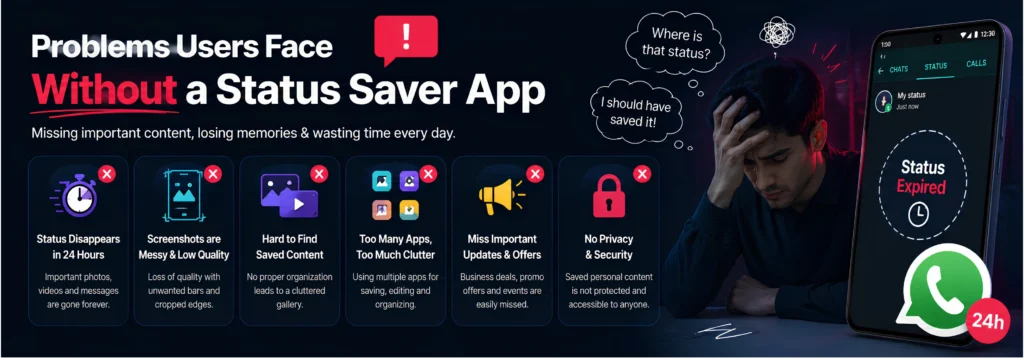
Screenshot Overload
One of the most common habits is taking screenshots.
While screenshots are quick, they also create unnecessary clutter.
Over time, users end up with hundreds or even thousands of random images mixed into their gallery.
Finding one important screenshot months later becomes frustrating.
Low-Quality Images
Screenshots often include:
- Notification bars
- Battery icons
- Cropped edges
- Reduced image quality
This makes them less suitable for future use, sharing, or inspiration.
Lost Content After 24 Hours
WhatsApp Status automatically disappears after one day.
Many people think:
“I’ll save it later.”
Unfortunately, later often becomes too late.
Without an organised workflow, valuable content is permanently lost.
Too Many Apps
Modern smartphone users already have dozens of apps installed.
Some people use:
- One app for status saving
- Another for editing
- Another for creating stories
- Another for making quotes
- Another for bookmarks
Managing multiple apps wastes time, consumes storage, and creates an inconsistent experience.
This is why many users are moving towards all-in-one productivity apps that combine multiple creative tools into a single platform.
What Makes a Great Status Saver App?
Not every best Status Saver app delivers the same experience.
Some focus only on basic functionality, while others are designed to improve the way users create, organise, and manage content.
When comparing the best WhatsApp Status Saver apps in 2026, these are the features that matter most.
Simple and User-Friendly Interface
The best apps don’t require technical knowledge.
Users should be able to navigate the app quickly without unnecessary steps or confusing menus.
Fast Performance
Nobody wants an app that freezes, crashes, or takes too long to load.
A good Status Saver should provide a smooth and responsive experience, even on entry-level Android devices.
Smart Content Organisation
Saving content is only the beginning.
A modern app should also help users organise their saved items efficiently, making them easier to find whenever needed.
Creative Tools
Today’s users expect more than basic functionality.
Useful creative features include:
- Story Maker
- Post Maker
- Quote Maker
- Text editing
- Modern fonts
- Colour customisation
- Ready-to-use layouts
These tools allow users to transform saved inspiration into fresh social media content.
Productivity Features
The best apps also help users stay organised.
Features such as Link Organizer and Bookmark Manager enable users to keep useful resources, websites, videos, and ideas in one place instead of losing them across different apps.
Privacy and Security
A trustworthy Android app should always respect user privacy.
Important features include:
- Secure local storage
- App Lock
- Personal collections
- Reliable performance
- Regular updates
Users should feel confident knowing their content remains private and organised.
Top WhatsApp Status Saver Apps in 2026
Choosing the right WhatsApp Status Saver app isn’t just about downloading the first app you see on Google Play. The best app should help you do more than simply save photos and videos. It should improve your overall content management experience, keep your media organised, and offer useful tools that save time.
In 2026, Android users have access to hundreds of Status Saver applications, but only a few provide a reliable, feature-rich, and user-friendly experience.
Below is a detailed comparison of some of the most popular options available today.
1. StatusCraft — Best All-in-One Status Saver App
Best For: Everyday users, content creators, influencers, students, entrepreneurs, marketers, and small businesses.
If you’re looking for more than just a basic WhatsApp Status Saver, StatusCraft is one of the most complete Android productivity apps available.
Unlike many apps that focus on a single feature, StatusCraft combines multiple content creation and organisation tools into one lightweight application.
Instead of switching between five or six different apps throughout the day, users can manage their entire content workflow from one place.
Key Features
✔ Save WhatsApp Status Photos
✔ Save WhatsApp Status Videos
✔ WhatsApp Business Status Support
✔ Link Organizer
✔ Bookmark Manager
✔ Favourite Collections
✔ App Lock
✔ Dark Mode & Light Mode
✔ Fast Performance
✔ Modern User Interface
✔ Lightweight Android App
✔ Regular Feature Update
Why StatusCraft Is Different
Most Status Saver apps solve only one problem—saving status photos or videos.
StatusCraft solves multiple everyday challenges.
Instead of downloading separate apps for:
- Saving status updates
- Creating Instagram stories
- Designing social posts
- Making quote graphics
- Organising useful links
- Managing bookmarks
You get everything in one beautifully designed application.
This all-in-one approach saves time, reduces storage usage, and creates a smoother user experience.
Built for Modern Content Creators
Today’s creators consume and produce content every day.
One minute you’re saving inspiration from WhatsApp.
The next you’re creating:
- Instagram Stories
- Facebook Posts
- Motivational Quotes
- Promotional Graphics
- Personal Content
StatusCraft helps connect all of these tasks into one creative workflow.
Rather than forcing users to jump between different apps, everything stays organised inside one platform.
Smart Content Organisation
Saving content is only useful if you can find it later.
StatusCraft focuses heavily on organisation.
Users can easily manage:
- Saved Status Photos
- Saved Status Videos
- Favourite Collections
- Useful Links
- Business Resources
- Educational Content
- Personal Inspiration
This makes the app valuable not only for casual users but also for professionals who regularly collect ideas and reference materials.
Designed for Speed
Nobody enjoys waiting for an app to load.
StatusCraft has been designed with performance in mind.
Benefits include:
- Fast loading
- Smooth navigation
- Lightweight installation
- Responsive interface
- Battery-friendly performance
- Storage optimisation
Even users with mid-range Android devices can enjoy a seamless experience.
Clean Interface
Many Status Saver apps are filled with distracting advertisements and outdated layouts.
StatusCraft takes a different approach.
The interface is:
- Clean
- Modern
- Minimal
- Easy to understand
- Beginner friendly
Users can start using the app immediately without a learning curve.
Privacy Matters
Privacy is becoming increasingly important.
StatusCraft helps users manage their personal content with features such as:
- Secure Local Storage
- App Lock
- Private Collections
- Personal Content Organisation
Your saved content stays organised while remaining under your control.
2. Status Saver by Various Developers
Many developers offer simple Status Saver apps on Google Play.
These apps usually provide basic features such as:
- Saving status photos
- Saving status videos
- Gallery access
While they can be useful for occasional users, they often have limitations.
Common drawbacks include:
- Too many advertisements
- Limited organisation features
- No creative tools
- Outdated user interface
- No bookmark management
- No story creation features
- Limited long-term productivity
If your only goal is occasionally saving a status, these apps may be sufficient.
However, users looking for a complete content management solution often require more advanced functionality.
3. Status Downloader Apps
Some apps focus exclusively on downloading status media.
Their primary goal is quick access to photos and videos.
Advantages include:
- Simple interface
- Fast downloads
- Lightweight installation
However, these apps generally stop there.
They rarely include:
- Story Maker
- Quote Maker
- Post Creator
- Link Organisation
- Bookmark Management
- Productivity Features
As users spend more time creating content, these missing features become increasingly important.
4. Story Creation Apps
Some Android apps specialise in creating stories for social media.
They often provide:
- Fonts
- Templates
- Stickers
- Colours
- Backgrounds
Although these apps are useful for designers and creators, they usually cannot help users save or organise WhatsApp Status content.
This means users still need separate apps for different tasks.
5. Bookmark & Link Management Apps
Another category includes apps dedicated to organising bookmarks and web links.
These are useful for saving:
- Websites
- YouTube videos
- Educational resources
- Business references
- Articles
However, these apps generally have no connection with WhatsApp Status management or creative content tools.
Again, users end up juggling multiple applications.
Why More Users Are Choosing All-in-One Apps
The Android ecosystem has changed significantly over the last few years.
People no longer want dozens of apps performing individual tasks.
Instead, users prefer one application that combines multiple features without sacrificing performance.
This trend has led to the rise of productivity-focused applications that simplify everyday workflows.
StatusCraft follows this philosophy by combining:
- Status Saving
- Story Creation
- Social Media Design
- Quote Graphics
- Link Organisation
- Bookmark Management
into a single experience.
StatusCraft vs Traditional Status Saver Apps
| Feature | StatusCraft | Typical Status Saver |
| Save Status Photos | ✅ | ✅ |
| Save Status Videos | ✅ | ✅ |
| WhatsApp Business Support | ✅ | Limited |
| Story Maker | ✅ | ❌ |
| Post Maker | ✅ | ❌ |
| Quote Maker | ✅ | ❌ |
| Link Organizer | ✅ | ❌ |
| Bookmark Manager | ✅ | ❌ |
| App Lock | ✅ | Sometimes |
| Modern UI | ✅ | Varies |
| Fast Performance | ✅ | Varies |
| Productivity Features | ✅ | ❌ |
| Content Organisation | ✅ | Limited |
The comparison clearly shows that while many apps perform the basic task of saving status updates, StatusCraft extends far beyond that by helping users create, organise, and manage content efficiently.

Who Should Download StatusCraft?
Content Creators
Collect inspiration, create engaging visuals, and keep all your ideas organised in one place.
Students
Save educational status updates, organise study resources, and bookmark useful learning materials for quick access.
Entrepreneurs
Store marketing inspiration, promotional content, and business resources without relying on multiple apps.
Small Businesses
Create promotional posts, design stories, and organise campaign ideas directly from your Android device.
Social Media Managers
Maintain a streamlined workflow by combining status management, content creation, and link organisation in one app.
Everyday WhatsApp Users
Whether it’s a memorable family photo, an inspiring quote, or a useful announcement, StatusCraft helps you keep important content organised and easy to find.
Why StatusCraft Deserves the #1 Spot
The best apps solve real problems instead of adding more complexity.
StatusCraft isn’t just another WhatsApp Status Saver it’s a complete productivity toolkit designed for modern Android users.
With one installation, you can:
- Save valuable status updates
- Organise your favourite content
- Create professional stories
- Design social media posts
- Build beautiful quote graphics
- Store important links
- Manage bookmarks efficiently
- Keep everything secure in one place
Rather than filling your phone with multiple single-purpose apps, StatusCraft provides a streamlined, organised, and creative experience that grows with your needs.
How to Choose the Right WhatsApp Status Saver App
Not every Status Saver app is built with the same goal in mind. Some apps focus only on saving photos and videos, while others are designed to improve your entire content management workflow.
If you’re searching for the best WhatsApp Status Saver app in 2026, it’s worth looking beyond download numbers or ratings. Instead, evaluate the features that will genuinely improve your day-to-day experience.
Here are the key factors to consider before installing any Status Saver app.
1. Ease of Use
A good app should be simple enough for anyone to use.
Whether you’re a student, professional, business owner, or first-time Android user, you shouldn’t need tutorials to understand the interface.
Look for an app that offers:
- Clean navigation
- Minimal learning curve
- Quick access to saved content
- Fast loading times
- Easy organisation
StatusCraft is designed with simplicity in mind, allowing users to start saving and organising content within minutes.
2. Performance Matters
Performance is one of the biggest differences between high-quality apps and average ones.
A poorly optimised app may:
- Crash frequently
- Take longer to open
- Consume excessive battery
- Use unnecessary storage
- Slow down your phone
StatusCraft is built to provide a lightweight and responsive experience, ensuring smooth performance across a wide range of Android devices.
3. Look Beyond Basic Status Saving
Many users initially download a Status Saver just to save a few photos.
Over time, however, they realise they also need tools for:
- Creating stories
- Designing social media posts
- Making quote graphics
- Organising useful links
- Managing bookmarks
Instead of installing separate apps for each task, an all-in-one solution like StatusCraft helps streamline your workflow and reduce clutter on your device.
4. Organise Your Content Efficiently
Saving content is only useful if you can find it later.
Imagine saving hundreds of:
- Inspirational quotes
- Business promotions
- Product ideas
- Educational resources
- Travel photos
- Event announcements
Without proper organisation, these quickly become difficult to locate.
StatusCraft helps users keep everything structured, making it easier to revisit important content whenever it’s needed.
5. Prioritise Privacy and Security
Your saved content often contains personal memories, business materials, or educational resources.
Choose an app that offers:
- Secure local storage
- App Lock
- Personal collections
- Privacy-focused design
- Regular updates
StatusCraft is built with user privacy in mind, giving you greater control over your saved content.
Common Mistakes People Make When Choosing a Status Saver
Many users download the first app they find, only to uninstall it days later.
Avoid these common mistakes.
Choosing an App Based Only on Ratings
High ratings don’t always reflect long-term usability.
Look at the features, update history, and overall user experience.
Ignoring Productivity Features
Saving status updates is only one part of content management.
Creative tools such as Story Maker, Quote Maker, and Post Maker can save significant time if you regularly create social media content.
Installing Multiple Apps
Many Android users unknowingly install:
- A Status Saver
- A Story Editor
- A Quote Creator
- A Link Manager
- A Bookmark App
This consumes storage and creates unnecessary complexity.
StatusCraft combines these features into one convenient application.
Overlooking Organisation
Without folders, collections, and bookmarks, saved content quickly becomes disorganised.
Choosing an app that supports structured organisation improves productivity in the long run.
Expert Tips for Managing WhatsApp Status Content
If you regularly save WhatsApp Status updates, these habits can help you stay organised.
Create Categories
Group your content into folders such as:
- Motivation
- Business
- Education
- Personal
- Marketing
- Travel
- Recipes
- Fitness
Save Only Valuable Content
Instead of saving every status you see, focus on content you’ll genuinely use in the future.
This keeps your library clean and relevant.
Review Your Collection Regularly
Delete outdated or duplicate items to keep your content organised and easy to navigate.
Turn Inspiration into Action
Don’t let useful ideas sit unused.
With StatusCraft’s Story Maker, Post Maker, and Quote Maker, you can transform saved inspiration into fresh, original content for your own audience.
Why StatusCraft Is the Best Choice in 2026
After comparing the available options, it’s clear that most Status Saver apps focus on one task—saving WhatsApp Status updates.
StatusCraft goes much further.

It brings together multiple productivity and creative tools in one intuitive Android app, making it suitable for both casual users and professionals.
With StatusCraft, You Can:
- Manage WhatsApp Status photos and videos
- Create engaging stories
- Design professional social media posts
- Build eye-catching quote graphics
- Organise important links
- Bookmark useful resources
- Keep everything in one organised workspace
Instead of switching between multiple apps, you can manage your complete content workflow from one place.
This not only saves time but also creates a smoother, more productive experience.
Frequently Asked Questions
What is the best WhatsApp Status Saver app in 2026?
The best app depends on your needs. If you’re looking for more than basic status saving, StatusCraft combines status management, story creation, post design, quote creation, and link organisation in a single app.
Are WhatsApp Status Saver apps safe?
Apps from trusted developers that follow Google Play policies and respect user privacy are generally the safest choice. Always download apps from the official Google Play Store.
Can I save both photos and videos?
Many Status Saver apps support both photos and videos. Check the app’s feature list to ensure it meets your requirements.
Does StatusCraft support WhatsApp Business?
Yes. StatusCraft is designed to help users organise content from both WhatsApp and WhatsApp Business workflows.
Is StatusCraft free to use?
StatusCraft offers core features that help users save, organise, and create content efficiently. Availability of premium features may vary with future updates.
Can I organise my saved content?
Yes. One of StatusCraft’s biggest strengths is helping users organise their saved content rather than simply storing it.
Can content creators benefit from StatusCraft?
Absolutely. Story Maker, Post Maker, Quote Maker, and Link Organizer make StatusCraft a valuable productivity tool for creators, influencers, marketers, and businesses.
Why should I use one app instead of several?
Using one all-in-one app simplifies your workflow, saves storage space, reduces app switching, and keeps your content organised in one place.
Final Verdict
WhatsApp Status has become an important way to discover ideas, stay informed, and connect with friends, businesses, and communities. Whether it’s an inspiring quote, a memorable photo, a product launch, or a useful educational resource, valuable content can disappear within 24 hours.
While there are many Status Saver apps available, not all of them deliver the same experience.
Some only save media. Others lack organisation tools, creative features, or regular updates.
StatusCraft stands out by offering much more than a traditional Status Saver. It combines status management with Story Maker, Post Maker, Quote Maker, Link Organizer, and Bookmark Manager, helping users create, organise, and manage their content from one central place.
If you’re looking for a reliable, modern, and feature-rich Android app that supports both productivity and creativity, StatusCraft is an excellent choice.
Save Smarter. Create Better. Stay Organised.
Take control of your content with one powerful Android app designed for modern users.